Home > Learning Center > Tutorials > Convert PowerPoint Presentations to AVI
AVI stands for Audio Video Interleave, which is a container video format that specifies certain structure how the audio and video streams should be stored within the file. Microsoft PowerPoint is usually happy with AVI video format unless it has been rendered using a non-standard codec. PowerPoint can play and control these AVI files natively. You can easily add AVI video to your PowerPoint presentations to jazz it up. As there are some limitations for viewing PowerPoint files, you may also want to convert your PowerPoint presentstions to AVI to expand their reach.
Well, you may get rid of these limitations by converting your PowerPoint presentations to AVI.
You need to use a third-party to transform your PowerPoint presentation to AVI for further distribution or save to DVD. Therefore, you can use Wondershare PPT2Video Pro to convert PowerPoint presentations to AVI.
Here below is a Step-by-Step guide to convert PPT to AVI video.
Step 1. Download the free trial version of this PPT to Video converter by clicking here.
Step 2. Install PPT to Video Pro on your Windows computer with Microsoft PowerPoint installed. Then launch it.
Step 3. Click Import to import the PowerPoint presentations you would like to convert to AVI. You are allowed to add up to 12 files at a time in single conversion project for batch conversion.
Step 4. You may see the properties of the output AVI in the Profile box and you can select it as the output format. If you want to customize the output video with more advanced properties, please click Advanced Settings.
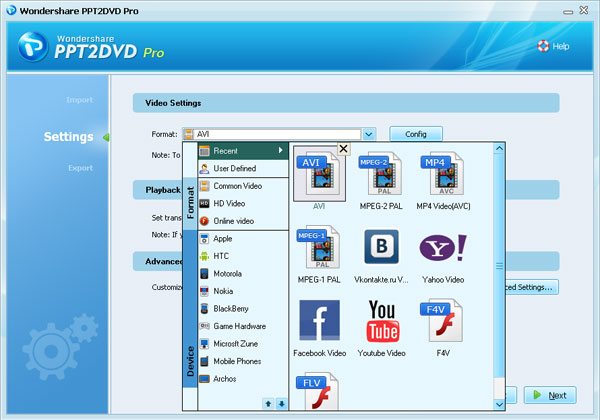
Step 5. If you like, you can click the Folder icon to change the output folder. Then click Start to begin the conversion process.
After transferring PowerPoint presentation to AVI or some other video formats provided in this PowerPoint to video converter, we can view it in Windows Media player or other media players, or you can share it on YouTube and most portable devices such as iPod, iPhone, iPad, Blackberry, Zune, PSP and so on. You can make the most out your PowerPoint presentation.
Note:
If you also want to burn your PowerPoint presentations to DVD for viewing on TV or plasma though DVD player and have no third-party video to DVD burner like Adobe Premiere 3 and the like, you may try our PowerPoint to DVD converter which not only allows you convert and burn your PPT to DVD, but also enables you to convert PowerPoint presentations to AVI and all other video formats supported in PowerPoint to Video converter.
Enjoy it, share it.

Recommended Product
Only $39.95 $49.95 Buy Now
Hot Articles
Hot Tag
